

error when clicking on drive icon(on MAIN page) to display DISK LOG INFORMATION - release 7.3.3
Expected Behavior
What did you expect to happen?disk log displayed
Actual Behavior
What actually happened?
“ATA<disk-number> command not found “
This seems to happen for disks that are part of the array. I get the normal log when clicking on boot device.
Steps to Reproduce
Go to MAIN page
Click on icon for any disk in the array
Additional Context
Anything else we should know? (recent upgrades, hardware changes, plugins, etc.)
happens with release 7.3.3. I have confirmed it did not happened with prior release 7.3.2
Workarounds
Have you found any workaround or temporary fix?
None.
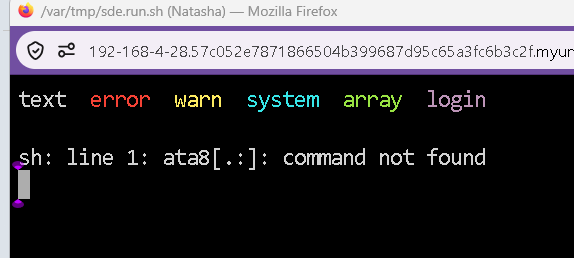
Screenshots / Videos / Diagnostics
Please attach the diagnostics and any videos or screenshots to demonstrate the issue
Loading content, please wait...
Loading content, please wait...
Loading content, please wait...
Loading content, please wait...
Loading content, please wait...
Loading content, please wait...
Loading content, please wait...
Loading content, please wait...
Loading content, please wait...
Loading content, please wait...
Loading content, please wait...
Loading content, please wait...